Auto Click
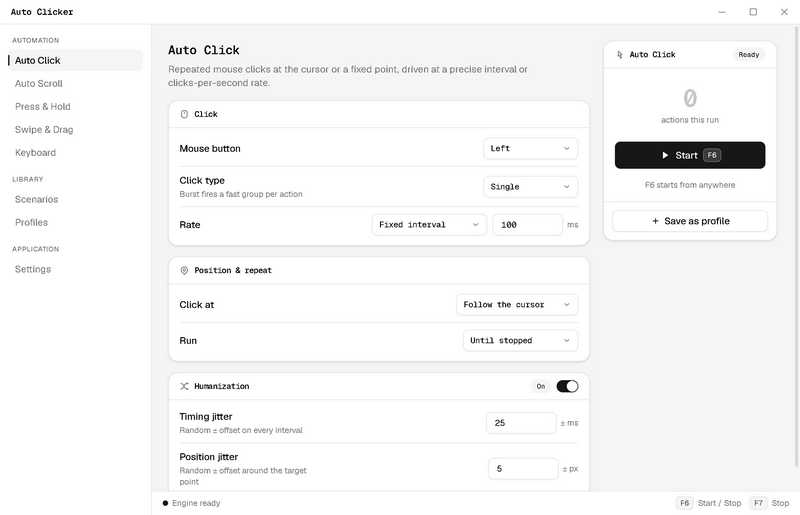
Repeated clicks at the cursor or a fixed point. Single, double, or burst per action, driven by a millisecond interval or a clicks-per-second rate.
Interval or CPS Single / Double / Burst Cursor or fixed point
Five input modes, a multi-step scenario builder, global hotkeys, and humanized timing. One Windows app, completely free.
Plenty of free tools click one spot at a fixed rate, and when that is the whole job, they are enough. Auto Clicker is built for the other jobs: repetitive desktop work with more than one step in it.
Every mode runs on the same synthetic-input engine, with its own rate, position, repeat, and humanization settings.
Repeated clicks at the cursor or a fixed point. Single, double, or burst per action, driven by a millisecond interval or a clicks-per-second rate.
Synthetic wheel ticks in any of the four directions, at a fixed amount and interval, for feeds and documents that never end.
Holds a mouse button down for a set duration per cycle, or until you stop it. For the interfaces where a long press is the input.
Key presses with modifier combos, and full Unicode text typing with per-character pacing.
Moves the cursor along a path, optionally dragging with a held button. Duration and easing control how the motion feels, and either end can be picked directly on screen.
Multi-step click and keyboard automation without scripting: chain the five modes plus wait and move-cursor steps into one flow, then run it on repeat.
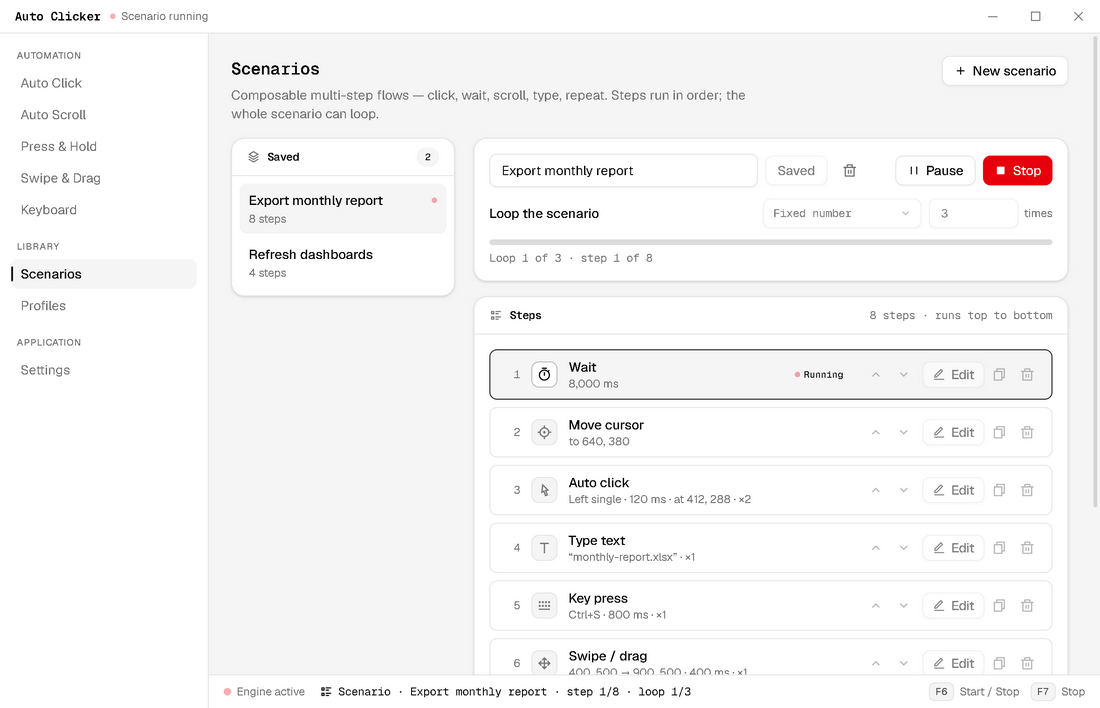
Steps execute top to bottom, and each one keeps its own timing, position, and repeat settings.
Repeat a fixed number of times or until stopped, with pause and resume available mid-run.
A live bar tracks the current loop and step, in the app and in the status bar.
F6 starts or stops the active mode from any application, and F7 is the emergency stop. Both can be rebound in Settings.
Randomized timing jitter and position jitter, tuned in ± milliseconds and ± pixels per mode, so a long run does not look machine-perfect.
Save any mode’s full configuration and reload it in two clicks, so recurring jobs keep their exact settings.
Click anywhere on screen to capture exact coordinates for fixed-point clicks, drag paths, and cursor moves.
The clicking part is a good one: precise rates, repeat limits, and fixed-point targeting. The difference is everything around it. Auto Clicker also presses keys, types text, holds buttons, drags along paths, and chains all of it into multi-step scenarios that loop.
Yes. The Keyboard mode sends key presses with modifier combos, like Ctrl+S, and types full Unicode text with per-character pacing. Both are also available as steps inside a scenario.
Yes, that is what Scenarios are for. Add one step per position with the point picker, insert waits between them, and loop the whole flow a fixed number of times or until you stop it. A scenario can hold up to 100 steps across eight step types.
Yes. Every mode, the scenario builder, humanization, profiles, and hotkey rebinding are all included, for free. There is no subscription, no trial, no license key, and no feature paywall.
Auto Clicker sends standard Windows input through SendInput, which most applications and many games accept. Some multiplayer titles prohibit automation or filter synthetic input with anti-cheat, so check the specific game's terms before automating in it.
Press F7. It is a global emergency stop that works no matter which application has focus. F6 starts and stops the active mode the same way, and both keys can be rebound in Settings.
No. Everything runs locally on your machine. Updates arrive through the Microsoft Store whenever you are online.
Through the Microsoft Store, so installs are sandboxed, signed, and updated automatically. There is no separate installer to download and no bundled extras.
Those are good tools in narrower categories: OP Auto Clicker is a single-point click looper, and TinyTask replays a recording of what you did. Auto Clicker is an automation suite: five input modes plus a scenario builder that chains clicking, typing, scrolling, and dragging into editable, loopable sequences.
Yes. Humanization adds randomized timing jitter in ± milliseconds and position jitter in ± pixels, configurable per mode, so long runs pace themselves like a person instead of a metronome.
Every mode, every feature, free on the Microsoft Store.